How My Portfolio Became a Place
Introduction
Before my portfolio was a village, it was a road and a black block.
The block could move. A camera followed it. Three buildings waited beside a narrow strip of asphalt, each carrying a piece of the portfolio. Reaching one opened that content. That was almost the entire experience.
The first version is still playable below. Use WASD or the arrow keys to move the block. First move sideways, across the road. Then turn toward a building and keep going until something happens.
Do not look for an Enter prompt. This version does not have one. The sparse scene makes its behavior easy to check: the road shows sideways drift, the empty ground shows how the camera follows, and the instant a panel opens shows what the program counted as an arrival.
Open Operate the first playable road ↗
The Time Machine provides the overview. Each selected checkpoint links to the section that discusses it, while the inline links below reopen that checkpoint without making you find it on the timeline. The sections stop at the systems that changed, using a playable version for behavior and a fixed frame when one state is easier to examine than continuous motion.
Keep one question from that first road in mind: what has to work together before a portfolio can feel like a place?
I. Movement, arrival, and return
First playable route → configurable scene
What does it mean to arrive?
The sparse road leaves its interaction rules exposed. Direction, distance, camera movement, and the moment a building responds are easy to inspect.
The road combines locomotion and navigation. Its direction and edges are easy to see, and each building acts as a spatial link.
Because the scene is sparse, each step is easy to see. Pressing a key changes the block’s position. The camera follows it. Each building compares the block’s position with its own footprint. When the two overlap, the portfolio panel opens.
The sparse layout doubled as a diagnostic scene. If the block drifted, the road supplied a straight reference line. If the camera framed movement badly, empty ground surrounded the mistake. If a building reacted too early, there were only three triggers to inspect.
In this revision, touching a building is enough to open its panel. Walking and choosing are the same action, so a small movement error can trigger a page transition.
The next version stops treating contact as consent. Approach a building and stop when the prompt appears. The avatar should no longer move farther into the building. Press Enter, close the panel, and compare the position before and after.
Proximity now makes an action available without taking it. The frame holds the approach state; the playable version lets you test entry and exact return.
This behavior arrived as a sequence of changes rather than one interaction rewrite. Proximity first became nearbyBuildingId, which made the action available without performing it. Enter promoted that nearby destination to activeBuildingId and paused movement while its panel was open. A directional guard then rejected movement farther into the active footprint. Finally, the application saved the avatar’s complete entry position before opening the panel and used that value when the panel closed.
Those variables describe different facts. nearbyBuildingId answers what can I enter? activeBuildingId answers what am I reading? isSectionOpen answers should movement still be accepted? The saved position answers where should the visit end? Reusing one value for all four questions would make the implementation shorter, but it would also blur states the visitor can distinguish.
The return-position detail is small and easy to lose. An earlier version closed the panel by moving the avatar back to the road’s centre line while retaining only its depth along the route. That was a safe location, but not the location the visitor had chosen. The entry contract copies the actual position at entry and restores all three coordinates on close.
The result is a sequence the visitor can predict: move, approach, choose, read, return. The trigger does not decide on the visitor’s behalf, content cannot leave movement running behind it, and closing the panel does not quietly rewrite the path already taken. The sparse scene now tests continuity as well as locomotion.
The next problem was visual. Comparing camera, blur, and shadow settings by editing constants made it hard to evaluate one change against another.
How could I compare visual changes?
Scene Lab made it possible to adjust the diorama effect, blur, shadows, and performance overlay while the scene is running. The Time Machine shows the visitor-facing result without those authoring panels. The two captures below differ in one setting: the diorama effect is disabled in the first and uses the recorded six-pixel blur in the second. Compare the central figure with the cottage and telephone booth near the edges.
The cobblestone, building models, telephone booth, contact shadows, and high angled camera make the scene read as a miniature. With blur enabled, the central route remains legible while the peripheral buildings lose detail. That changes how easily a visitor can recognise destinations near the edge.
The six-pixel value was stored in scene settings and adjustable from Scene Lab. The same panel exposed character shadows, building shadows, and the performance overlay. I could change one setting and inspect the rendered result without rebuilding or trying to remember the previous value.
These captures preserve the authoring interface. The Time Machine uses a visitor-facing view with those tools hidden. Later Scene Lab versions add controls for cameras, models, grounding, bounds, and entities.
The next revision replaced the generic human with a fox. That added visible orientation, foot placement, and animation to the movement system.
II. The fox and the growing village
Rigged character → expanded village
What did the fox make easier to test?
Try a short movement: walk toward the side of a building, then release the key. Watch the body rather than the destination. Did its position change? Which way is it looking? Is the gait still playing? Do the paws appear to meet the road?
The body now has a front, paws, a gaze, and a gait. Those cues make mismatches among movement, facing, grounding, and animation easier to see.
A block can move into an obstacle without revealing much beyond its coordinates. It has no natural front, no paws to sink into the road, and no gait that can continue after travel has stopped. The fox adds several visual signals to the same movement.
The fox has feet, a head, a gaze, a gait, and an idle pose. That makes four states visible at once:
- requested direction - what the keyboard or touch control asks for;
- actual displacement - where collision and scene bounds allow the body to move;
- facing - which direction the model presents as forward;
- animation - which clip plays, and how quickly it advances.
When those states agree, the motion looks coherent. Their failure modes are now recognisable. If the requested direction drives animation after collision prevents displacement, the fox walks in place. If facing follows stale input, the body can slide sideways. If the model’s origin is mistaken for the position of its feet, the ground calculation can be numerically correct while the paws appear to float.
The clean historical view above shows the result. The authoring study below separates some of the signals used to judge it. The walk clip has been forced without requiring actual travel. A magenta ring marks the locomotion system’s ground point, while the wireframe cage exposes the model bounds.
This is authoring evidence, not the visitor view. Forced animation, model bounds, and the computed ground point are visible together so apparent motion and physical contact can be judged separately.
The fox arrived over several commits. b5eaef8 introduced the rigged model and connected idle, walk, and sit clips to movement and bench proximity. Later revisions added entity inspection, forced animation previews, idle timing, playback tuning, stricter clip selection, and broader spatial integration. The character gave movement and animation errors visible symptoms.
This fox was not yet a narrator or guide. The model affected the experience through gait, gaze, and foot placement. As the village expanded, its destinations and visual detail made orientation a separate problem.
What became harder as the village grew?
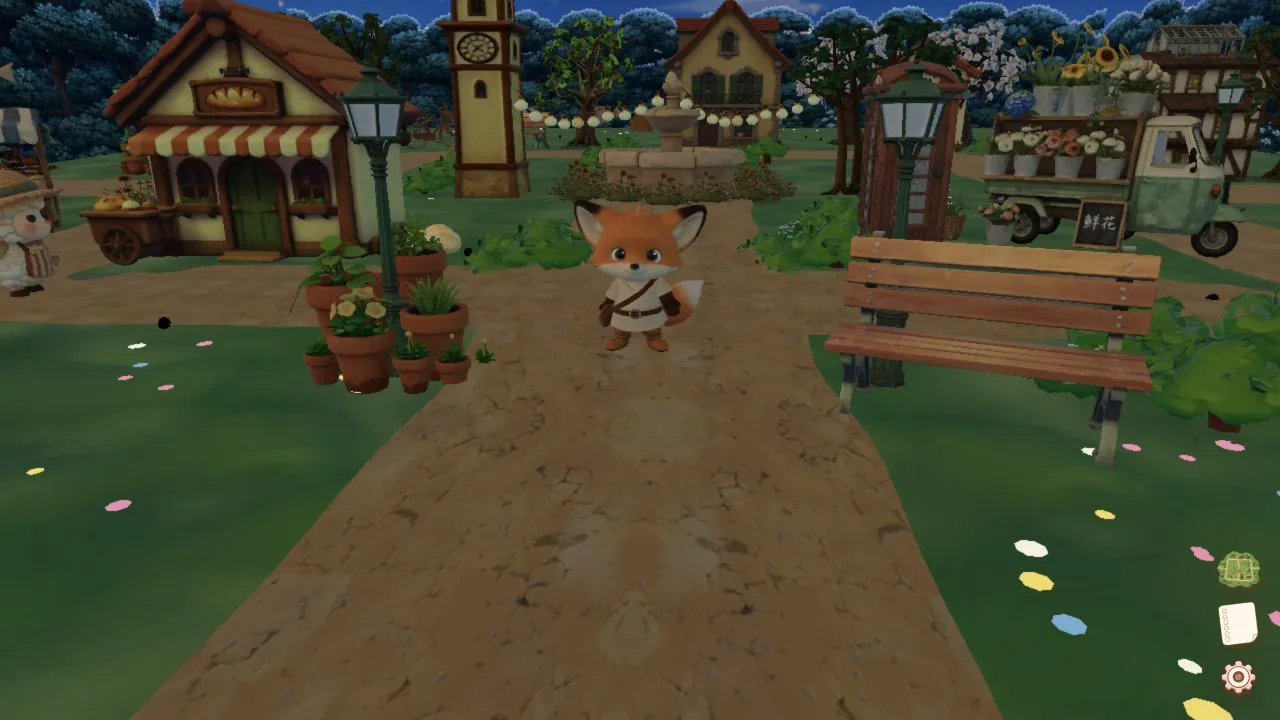
The straight road expanded into a village of cottages, props, and branching paths. Compare how quickly you can identify a route with the first road still fresh in mind.
The larger village adds more destinations and visual cues, which makes the main route less obvious.
I added cottages, shops, flower patches, props, a fountain, lighting modes, sound, touch controls, and environment settings. Decoration also affected navigation. Enough flowers changed which edges looked walkable. Each new building added portfolio content and another shape to recognise. Night mode changed the contrast, shadows, and visibility of directional cues.
Some conventional interface elements were also restyled to match the scene. The cookie preference below appears as Foxy’s oversized thought bubble. It remains a browser preference, but its placement and scale make it part of the village composition.
The cookie preference is presented as Foxy's thought bubble. The treatment matches the character, but the large panel competes with the route and nearby destinations.
The straight road indicated one route. The village presented several plausible routes, which made a specific named destination harder to locate from the 3D view alone.
The commit history cannot tell me whether a particular visitor became lost. The frame does establish the design pressure: more destinations, weaker route hierarchy, and more interface elements competing for the same view.
The map helped by omitting most of the scene’s detail.
III. The map and the About room
Compact map → connected interior
What must a map preserve?
The map appears in the lower corner of the complete frame. Then compare the enlarged crop and try to read every destination without referring back to the buildings.
The complete historical frame shows where the map sits in the interface. Its small size leaves little room for destination labels.
A mechanical crop of the same frame - no later map substituted. The map removes material, height, animation, and atmosphere so names and relative positions are easier to read; several labels still crowd or truncate.
The map and the 3D scene show the same village at different levels of detail. In the scene, a cottage is a roof line, doorway, shadow, collision footprint, interaction area, and part of a path composition. The map omits those attributes and retains a name, a relative position, and a selection target.
The labels also show the limits of the map’s small size: several crowd or truncate. The same layout problem now appears in a smaller area. Selecting a destination relocates the fox directly in this revision. The visible sky-drop journey belongs to a later version and is not part of this screenshot.
The map can bring the visitor to a building. It does not define what happens after the visitor arrives.
What happened after arriving?
The About doorway led to a fixed room scene. Operate the map, doorway, room, and return as one sequence.
Four screenshots preserve the full path into the room and back:
This requires more state than replacing one 3D scene with another. The visitor chooses About from the map, arrives at its threshold, presses Enter, and opens a fixed room layout. The outdoor Canvas remains mounted behind the content in demand mode, player movement pauses, and closing the room returns control to the village.
The bed, tiny television, food, shelves, warm wood, and sleeping cat establish a domestic setting. Their autobiographical meaning is not recoverable from the commit, so the objects are left to carry the atmosphere visible in the room.
The room is a fixed 3D panel rather than another walkable area. The map had to select the correct building, the threshold had to show the Enter prompt, movement had to pause while About was open, and closing it had to return the fox to the same place.
The character, ground, collision, camera, map, prompt, room, and React state each tracked part of the visit. The application could connect places, but it still treated the activities inside them as unrelated events.
IV. From destinations to a journey
Separate activities → persisted progress
The village already contained several kinds of activity. A flower page ran inside an iframe. The bookshop and bakery used their own page events. Petting the bunny happened in the 3D scene. Switching the environment changed application state. Map travel completed through another state path. None of those features needed a quest system in order to work.
Foxy’s List added a small translation layer over them. Inspect the checklist before completing anything. Each row names an action in visitor language, while the code maps that action to an event the existing feature already emits.
The list is a projection of shared progress, not the owner of eight separate features. The activities already exist; the trigger vocabulary and persisted completion state connect them.
The trigger vocabulary is the boundary between them. The flower page reports that a bouquet was made; it does not update checklist UI. Map travel reports completion; it does not know which story row that event satisfies. The quest reducer accepts canonical trigger names, ignores repeats, records a completion time, and persists the resulting set. The checklist is then a projection of that state.
That separation matters when the same activity crosses rendering systems. An iframe message, a React button, a Three.js proximity interaction, and an environment transition have different mechanics. Once translated into the same trigger vocabulary, they can contribute to one visit without importing one another or sharing UI state.
Persistence changes the meaning of the list. Reloading the page does not turn a completed activity back into an unchecked suggestion. Repeating an activity does not increment an accidental counter. The state records whether a distinct discovery happened, not how many low-level events happened to fire.
A checklist cannot tell me whether visitors wanted one or whether they completed every item. The architectural change is narrower: the portfolio acquired a durable account of actions taken across otherwise independent parts of the application.
V. Making travel and tests repeatable
Public test protocol → visible map journey
What had to exist before the Observatory?
The first Test Kit exposed a few named movement routines. Its public protocol made those routines addressable from outside the panel. A scenario could be selected by a visible control, a startup URL, a DOM command, or a custom event; every route resolved to the same canonical scenario definition.
The world deliberately looks much like the surrounding versions because the Time Machine hides development panels. The authoring build publishes whether the kit is ready, which scenario is running, whether it passed, and the evidence collected during the run as declared attributes on the document.
The runner does not implement a second version of movement. It writes to an external input channel, then the ordinary input composition, locomotion, collision, animation, and telemetry paths consume that command. This makes a passed run evidence about the application boundary rather than evidence about a test-only shortcut.
Panel URL DOM command Custom event → Canonical scenario → External input → locomotion → collision → animation → Declared result and evidence
Readiness is similarly specific. “The Test Kit mounted” does not mean “the 3D scene can accept movement.” The protocol exposes scene lifecycle, player-control availability, run state, and final result separately. Automation can wait for the condition it actually requires instead of sleeping for a guessed number of seconds.
The formal protocol matters later in this article because the Observatory is not the source of truth. Its buttons, graphs, result attributes, and external browser runners are different views over declared scenarios and measurements. The control room became richer without changing what a named run meant.
When did relocation become travel?
The first map moved the fox directly to a destination. That is efficient, but it removes the route between the two places. The camera sees one location before the click and another after it; the map’s spatial claim is never shown in the world.
Choose a map destination and watch the transition rather than the endpoint. Control pauses, the camera pulls away and pans toward the target, the fox appears above the destination, gravity completes the descent, and control returns after landing.
A scripted capture selects the Fountain and stops during the airborne phase. The elevated frame makes the destination and surrounding village continuous with the route selected on the map.
The implementation treats that sequence as a small orchestrator with explicit phases. The map starts travel and supplies the destination. A camera channel performs the pan without routing per-frame cinematic state through React. Teleportation happens only when the camera reaches its handoff. The locomotion system already knows how to settle a body toward the ground, so the arrival uses that path instead of adding separate drop physics. The session returns to idle only after the landing is complete.
The first sky-drop implementation was not actually an operable historical build. Its source landed before the camera and application dependencies were fully wired: Vite could transpile it, but the repository’s TypeScript build failed. The next version connected the channel, hook, runtime, and overlay into one working path. Preserving source is not enough for a playable history; the archived version also has to satisfy the build contract it claims to preserve.
The cinematic does more than decorate teleportation. It shows that the destination lies elsewhere in the same scene, keeps the map selection connected to a visible route, and gives the visitor a clear point at which control leaves and returns.
VI. Repeatable tests and better diagnostics
Repeatable scenarios → browser runners
Can a passing test still describe a bad experience?
Start with the green badge in this saved development capture. The named movement scenario passed. Now look beside it at the frame graph and timing summary.
The movement check passed while the same development capture showed high frame times and many hitches. The green badge applies only to the movement invariant.
The movement segments completed clearly enough for that scenario to pass. The same panel showed a median frame around 83.4 milliseconds, a 95th percentile around 100.9 milliseconds, an 850-millisecond worst frame, and 47 hitches. Those numbers belong to one historical development run, not to production and not to every device.
The two measurements answer different questions. The scenario checks whether the fox completed a declared movement. The timings record how the browser delivered frames during that movement.
The project needed instrumentation to separate those results. The first Test Kit replaced improvised walking with named Walk, Smoke, and Loop routines. Those routines made failures repeatable, but the early output did not identify where a failed or slow run diverged.
Subsequent revisions separated commanded input, consumed input, physical activity, presentation activity, React updates, and scene-composition updates. The Observatory placed those signals beside time, renderer work, lifecycle, travel, environment, terrain, interaction, position, and a short event history.
The Time Machine hides developer tools during normal use. This authoring view places the rendered village beside the runtime state recorded by the application.
That context matters because the same visible stutter can have different causes. Input may arrive but not be consumed. Collision may stop displacement while animation continues. Opening an HTML prompt may update React above the Canvas. A shadow caster may enter the camera. The browser may hide the tab, or the diagnostic graph may itself add work. An FPS counter does not identify which cause produced a slow frame.
Later performance tests checked both workload completion and rendering reductions. In one rapid-input workload, presentation updates fell from 80 to 2 while all 80 commanded and physical transitions still completed. A result that silently discarded 78 commands would have measured an incomplete workload. Workload integrity had to pass before the timing result was valid.
The in-page tools now exposed more runtime state. Browser lifecycle and process events still required an external runner.
What required a browser-level runner?
A browser-level runner can record page lifecycle, navigation, process memory, renderer restarts, WebGL context loss, and the behavior of a particular browser engine. The mobile-performance phase combined in-page scenarios with Chrome and native Mobile Safari workflows before comparing it with the later restoration.
Mobile required changes to touch input, viewport handling, WebKit behavior, memory use, visibility, and rendering budget in addition to the responsive layout.
For a time, the mobile profile removed decorative objects. The change reduced rendering work but also made the village look sparse. The paired captures make the fidelity cost visible; the later version restores the complete prop configuration.
The target included more than the draw count. The village still had to look recognisable, and each test result had to identify the browser and device used. Restoring the decoration shows that visual quality remained part of the performance decision.
The test environment limits the claim. Chrome’s mobile emulation is still desktop Chrome. The iOS Simulator can exercise WebKit integration, but it is not a physical iPhone and cannot measure heat, battery use, the real GPU, unified memory pressure, or process termination. Every mobile result needs its browser and device named beside it.
When should an optimization be reversed?
The mobile render profile initially reduced more than resolution and shadow cost. It also selected a smaller set of scene props. That lowered memory and rendering pressure, but it changed the composition: paths had fewer edges, destinations lost nearby objects, and the village became a thinner version of the desktop scene.
Compare it in a narrow viewport with the reduced mobile version. The restoration does not abandon the mobile budgets or browser runners. It changes the asset-selection policy so the mobile scene receives the full authored prop configuration again.
That reversal is easier to reason about because the performance work had already become measurable. The earlier change could be evaluated for memory, frame delivery, and workload completion; the later change could restore visual density without discarding those checks. “Fewer objects” was an implementation choice, not the product requirement.
The restoration also changed validation. Instead of asserting only that mobile retained required interactive props, the scene validator began checking that every configured prop survived the mobile projection. The visual decision became a source-level invariant, which made a future accidental reduction easier to catch.
A matched simulator capture can show which props and landmarks returned. Physical-device memory headroom and thermal behavior still require named hardware runs. Performance and fidelity remained simultaneous constraints.
VII. A place is a stack of agreements
Shared scene state
The fuller village is not one feature. It is the point at which movement, navigation, content, and testing all need compatible descriptions of the same scene.
Before leaving the article, repeat the opening route. Move sideways. Approach a building. Stop when the prompt appears, press Enter, then close the content and look at where the fox returns.
The verb sequence is still move, approach, enter, and return. What changed is the number of systems that must agree while it happens.
The fox and the ground must agree about contact. Requested input, actual displacement, facing, and animation must agree about locomotion. Visible walls and collision geometry must agree about which space is walkable. The map and the scene must agree about where destinations are. Travel and camera state must agree about when control has left the visitor and when it can safely return. Proximity, open content, paused controls, and the saved entry position must agree about the boundaries of a visit. A named scenario and its recorded workload must agree about what a passing result means.
Each representation can be locally correct while the complete experience is wrong. A mathematically grounded model can still look as if its paws are floating. A map can contain the right coordinates and still make its labels unreadable. A movement scenario can pass while the browser delivers a frame every hundred milliseconds. A lower draw count can satisfy a budget by deleting the composition that made the village recognisable.
The black block was simpler because one position described almost everything the visitor could see. The village made the same visit exist simultaneously in the scene graph, the movement system, React state, the map, the camera channel, the content layer, and the test protocol. It began to feel like a place when those descriptions converged - when a doorway meant the same thing to the fox, the prompt, the room, the return position, and the tests around them.
This is not a final state. New destinations and interactions can change the scene while preserving those agreements; a better implementation may replace one of them entirely. The Time Machine adds another representation to keep honest: history. It leaves the black block, generic human, first fox, crowded map, early room, and reduced mobile scene operable instead of compressing them into a launch story.
That makes the rough versions useful again. They let a reader isolate one dependency at a time, test the claim in the prose, and see where the next problem came from. The portfolio is still being built. Its history now behaves less like a sequence of screenshots and more like the place itself: something you can enter, move through, and question.